What is Next.js & why use it over React (concept)
Understanding the Foundation
Before we dive into building with Next.js, it's critical to understand what it is, why it was created, and how it compares to plain React. This conceptual clarity will save you hours of confusion later.
What is React?
React is a JavaScript library developed by Meta (Facebook) for building User Interfaces. It lets you build reusable UI components and manage state efficiently.
However, React alone is just a UI library — it doesn't give you:
- A routing system
- Server-side rendering
- API routes
- Optimized image handling
- Built-in performance optimizations
You'd have to wire all of this together manually using third-party libraries like
react-router-dom, webpack, axios, etc.jsx
// Plain React — you manage EVERYTHING manually
import React from 'react';
import { BrowserRouter, Route } from 'react-router-dom';

function App() {
  return (
    <BrowserRouter>
      <Route path="/" component={Home} />
      <Route path="/about" component={About} />
    </BrowserRouter>
  );
}
This works, but it becomes complicated fast — especially for production-grade apps.
What is Next.js?
Next.js is a React Framework built by Vercel. Think of it as React with superpowers — it gives you everything React is missing, out of the box.
"Next.js is the production-ready way to build React applications."
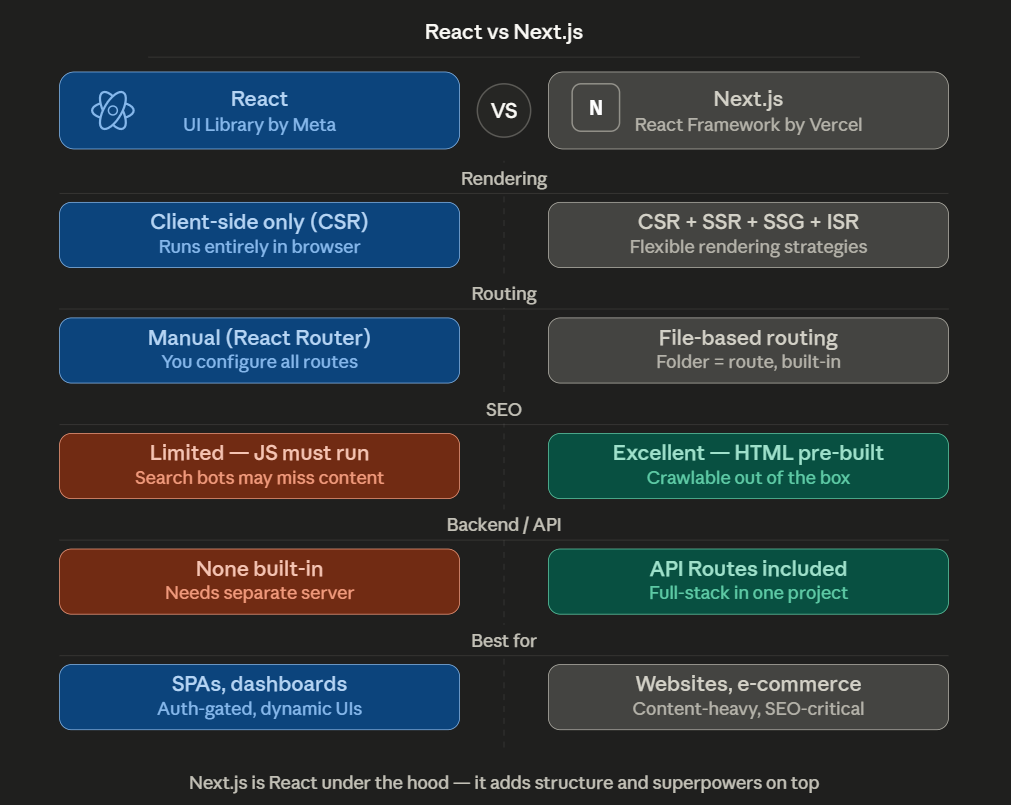
Next.js adds:
- File-based Routing — No need for
react-router. Just create a file, you get a route. - Server-Side Rendering (SSR) — HTML is pre-generated on the server for each request.
- Static Site Generation (SSG) — Pages are pre-built at compile time for blazing speed.
- API Routes — Build backend endpoints inside your Next.js project.
- Image Optimization —
next/imageauto-optimizes images (WebP, lazy loading, resizing). - Built-in CSS & Sass Support
- TypeScript Support out of the box
- App Router (Next.js 13+) — New routing paradigm using React Server Components
React vs Next.js — Side by Side
| Feature | React | Next.js |
|---|---|---|
| Routing | Manual (react-router) | File-based (automatic) |
| SSR / SSG | Not built-in | Built-in |
| API Routes | No | Yes |
| Image Optimization | No | Yes (next/image) |
| SEO Friendly | Poor (CSR only) | Excellent |
| Setup Complexity | Low (but scales poorly) | Low, scales perfectly |
| Deployment | Flexible | Optimized for Vercel |
Rendering Strategies in Next.js
This is one of the most powerful things about Next.js — you can choose how each page is rendered.
1. Client-Side Rendering (CSR)
React's default. The browser downloads a blank HTML page, then JavaScript runs to render content.
Problem: Bad for SEO, slow initial load.
Problem: Bad for SEO, slow initial load.
2. Server-Side Rendering (SSR)
HTML is generated on the server on every request and sent to the browser.
Great for pages with real-time data (e.g., stock prices, user dashboards).
Great for pages with real-time data (e.g., stock prices, user dashboards).
jsx
// Next.js SSR example
export async function getServerSideProps() {
  const res = await fetch('https://api.example.com/data');
  const data = await res.json();
  return { props: { data } };
}
3. Static Site Generation (SSG)
HTML is generated at build time and cached.
Best for blogs, docs, marketing pages.
Best for blogs, docs, marketing pages.
jsx
// Next.js SSG example
export async function getStaticProps() {
  const res = await fetch('https://api.example.com/posts');
  const posts = await res.json();
  return { props: { posts } };
}
4. Incremental Static Regeneration (ISR)
A hybrid — pages are statically generated but can be regenerated after a set time.
jsx
export async function getStaticProps() {
  return {
    props: { data },
    revalidate: 60, // Regenerate every 60 seconds
  };
}
File-Based Routing Magic
In plain React, routing requires manual configuration. In Next.js, the file system IS the router.
pages/
  index.js        →  /
  about.js        →  /about
  blog/
    index.js      →  /blog
    [slug].js     →  /blog/any-post-name   (dynamic route!)
No imports, no config — just create a file and you have a route.
API Routes — Backend Inside Frontend
Next.js lets you write backend API endpoints directly inside your project:
js
// pages/api/hello.js  →  accessible at /api/hello
export default function handler(req, res) {
  res.status(200).json({ message: 'Hello from Next.js API!' });
}
This means you can build full-stack apps in a single Next.js project!
When Should You Use Next.js Over React?
| Use Case | Use React | Use Next.js |
|---|---|---|
| Simple SPA (dashboard, todo app) | ✅ | ✅ |
| Blog / Marketing site | ❌ | ✅ |
| E-commerce site | ❌ | ✅ |
| App needing SEO | ❌ | ✅ |
| App with backend APIs | ❌ | ✅ |
| Real-time app (chat, live data) | ✅ | ✅ |
Rule of thumb: If your app needs SEO, server-side data, or you want a full-stack solution — choose Next.js.
Why the Industry Loves Next.js
- Used by Netflix, TikTok, Twitch, GitHub, Hulu, Nike and thousands more
- Backed by Vercel with continuous updates
- Largest adoption growth among React frameworks
- First-class support for TypeScript, Tailwind CSS, Prisma, and more
Watch This to Solidify Your Understanding
This is the official Next.js crash course by Traversy Media — covers everything in this lesson visually.
Key Takeaways
- React is a library; Next.js is a framework built on top of React
- Next.js adds routing, SSR, SSG, API routes, and image optimization out of the box
- You can choose rendering strategy per page in Next.js
- Next.js is the go-to choice for production-ready, SEO-friendly web apps
- File-based routing makes building multi-page apps extremely simple