Introduction
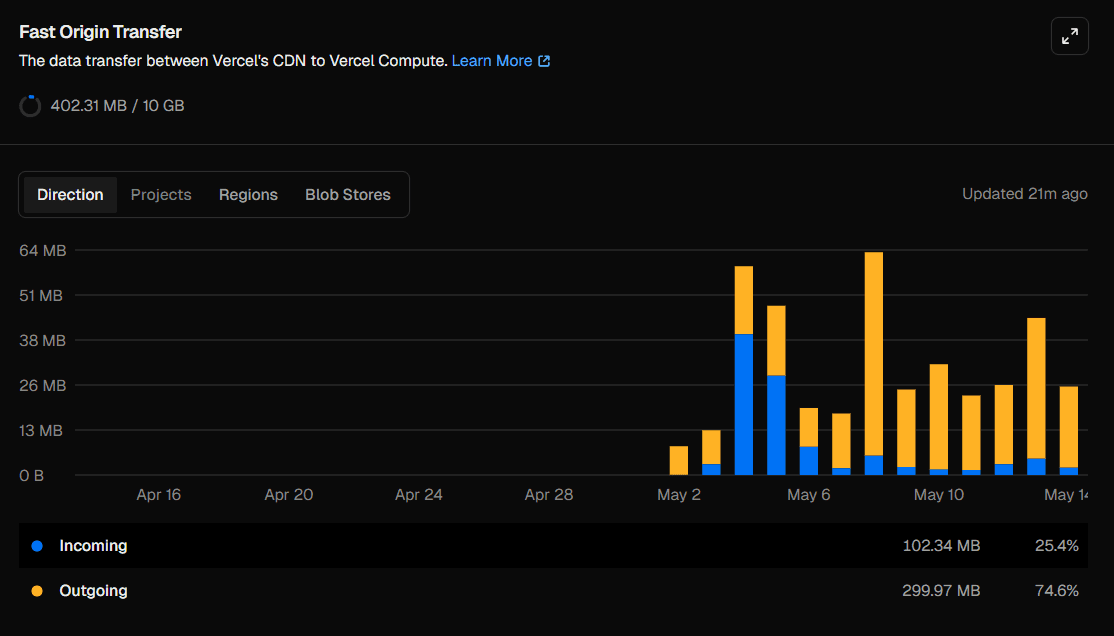
If you've spent time in the Vercel dashboard, you've probably noticed a metric called Fast Origin Transfer under your usage statistics. It's easy to overlook—until the numbers start increasing and you're wondering what they actually represent.
In this guide, we'll cover:
- What Fast Origin Transfer is
- The difference between Incoming and Outgoing transfer
- What causes usage to increase
- Practical ways to reduce it and stay within Vercel's free tier
What Is Fast Origin Transfer?
Fast Origin Transfer measures the amount of data transferred between Vercel's Edge Network (CDN) and Vercel Compute (Serverless Functions, Server Components, and API Routes).
It does not measure bandwidth between your website and your visitors—that is tracked separately.
A typical request looks like this:
- A user requests your website.
- The request reaches Vercel's Edge Network.
- If the content isn't cached, the edge forwards the request to Vercel Compute.
- Your application generates the response.
- The response is sent back to the edge.
- The edge serves the response to the user.
The data transferred during steps 3 and 4 is counted as Fast Origin Transfer.
The word "Fast" refers to Vercel's internal network connecting its edge infrastructure and compute platform.
Incoming vs Outgoing Transfer
Fast Origin Transfer is split into two categories.
Incoming
Incoming transfer is data flowing from the Edge Network to Vercel Compute.
Examples include:
- Form submissions
- POST request bodies
- File uploads
- Request payloads
If your application primarily serves pages and APIs without accepting large uploads, incoming transfer is usually relatively small.
Outgoing
Outgoing transfer is data flowing from Vercel Compute back to the Edge Network.
Examples include:
- HTML pages
- Server Component payloads
- API responses
- Images generated by your application
- JSON responses
For most applications, outgoing transfer is significantly higher than incoming transfer because responses are typically much larger than requests.
Understanding Your Usage
When reviewing your usage graph, you might notice patterns such as:
- Little or no traffic during quiet periods
- Spikes after sharing your project publicly
- Consistent daily outgoing transfer from regular visitors
If outgoing transfer dominates, that's generally expected for applications serving mostly GET requests.
What Increases Fast Origin Transfer?
Several common scenarios increase Fast Origin Transfer usage.
Server-Side Rendering (SSR)
Every uncached SSR request requires communication between the edge and compute.
More uncached SSR pages mean more transfer.
API Routes
Every request to an API route passes through compute.
Frequent API requests naturally increase transfer.
Large API Responses
Returning large JSON payloads increases outgoing transfer.
For example, sending thousands of records in one response consumes far more bandwidth than returning a paginated result.
File Uploads
Uploading files through API routes increases incoming transfer because the file must travel through your server.
Low Cache Hit Rate
If pages or API responses aren't cached effectively, compute must regenerate them repeatedly.
This increases Fast Origin Transfer unnecessarily.
1. Use Static Generation Whenever Possible
Static pages are served directly from the edge without invoking compute.
export const dynamic = "force-static";

// Dynamic routes
export async function generateStaticParams() {
  const posts = await getPosts();

  return posts.map((post) => ({
    slug: post.slug,
  }));
}
Static generation eliminates compute requests for cached pages.
2. Use Incremental Static Regeneration (ISR)
ISR allows pages to remain cached while periodically refreshing in the background.
export const revalidate = 60;

export default async function BlogPost({ params }) {
  const post = await getPost(params.slug);

  return <Article post={post} />;
}
Instead of generating a page for every visitor, the page is regenerated only once during each revalidation interval.
3. Cache API Responses
API routes can also be cached.
export async function GET() {
  const data = await fetchPublicData();

  return Response.json(data, {
    headers: {
      "Cache-Control":
        "public, s-maxage=300, stale-while-revalidate=600",
    },
  });
}
This allows the edge to serve cached responses, reducing calls to compute.
4. Paginate Large Responses
Avoid returning large datasets when only a subset is needed.
Instead of:
const allPosts = await db.post.findMany();Use pagination:
const posts = await db.post.findMany({
  take: 20,
  skip: (page - 1) * 20,
});
Smaller responses reduce outgoing transfer and improve response times.
5. Upload Files Directly to Vercel Blob
Instead of routing uploads through your server, upload directly to Vercel Blob.
import { put } from "@vercel/blob";

const blob = await put(filename, file, {
  access: "public",
});
Direct uploads bypass your server, reducing incoming Fast Origin Transfer.
What's the Free Tier Limit?
On the Vercel Hobby plan, you receive:
- 10 GB of Fast Origin Transfer per month
For many personal projects and small production applications, this allowance is sufficient.
If your application relies heavily on SSR, serves large API responses, or experiences significant traffic, it's worth monitoring this metric regularly.
Higher-tier plans include larger limits, with additional usage billed based on consumption.
Conclusion
Fast Origin Transfer measures the internal bandwidth between Vercel's Edge Network and Vercel Compute.
The biggest contributors are:
- Server-side rendering
- API routes
- Large responses
- File uploads
- Poor cache utilization
You can reduce usage by:
- Using static generation
- Leveraging Incremental Static Regeneration (ISR)
- Caching API responses
- Paginating large datasets
- Uploading files directly to Vercel Blob
For most projects, the Hobby plan's allowance is more than adequate. Understanding what drives Fast Origin Transfer helps you build applications that are both performant and cost-efficient as your traffic grows.